

The side effect of using AI to generate code is velocity. We are writing more code, faster than ever, and the bottleneck has quietly moved downstream — to review.
If you’re using AI to generate the bulk of your boilerplate or feature work, your human review capacity is now the constraint. Every team writing this much code with this much help eventually has to admit that some of the review will have to be automated too.
But “asking Claude to review a PR” isn’t really a strategy. You can’t fire off a prompt and hope for the best; you need a bit of architecture around it. Over the last few months I’ve settled on two patterns: the Ralph Loop, for deep context, and the External Engine, for event-driven tasks.
Pattern A: The Ralph Loop (The Deep Context Loop)
The first pattern is based on the “Ralph Loop,” a concept articulated well in this article on DevGenius (source code here). Yes, named after that Ralph.
This pattern is well suited to automated code reviews on large pull requests.
The core idea is recursion. A single Claude session runs in a loop, maintaining its context window. It doesn’t just look at the code once; it thinks about the code, then it thinks about its own thoughts.
How I Configure It
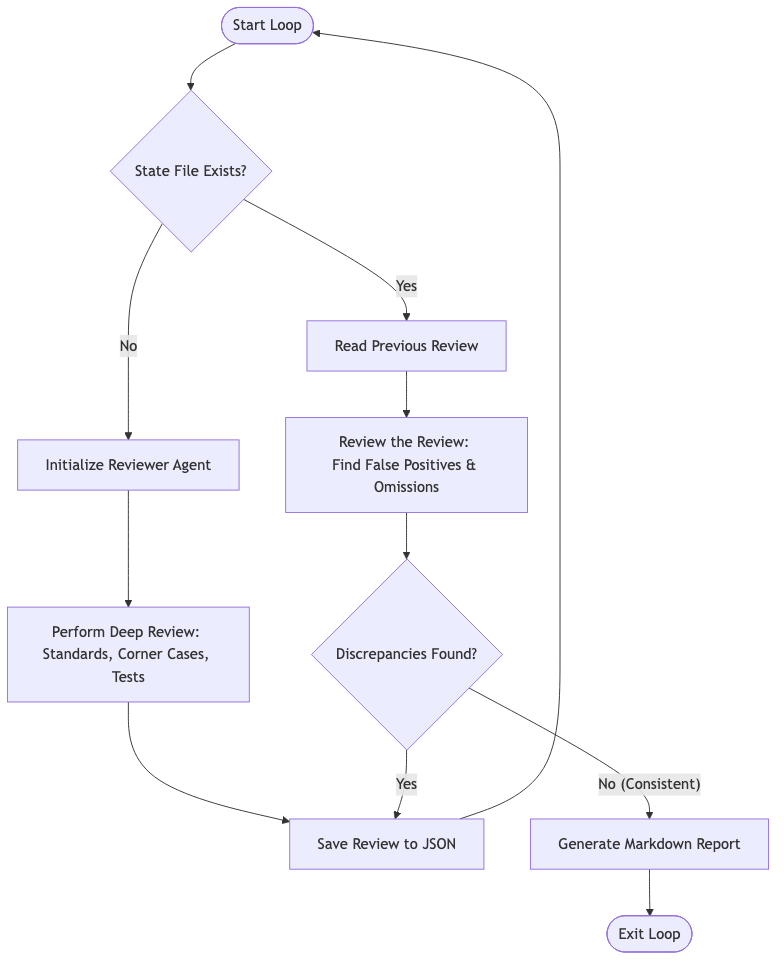
I set up the loop to maintain state in a local JSON file.
- Initialization: When I launch the loop on a PR, it checks the state. Finding none, it launches the “Senior Reviewer” agent. This agent is prompted to be thorough: corner cases, duplication, missing test coverage, architectural alignment.
- The Recursive Pass: On the next iteration, the agent sees that a review already exists. Its focus shifts. Now it reviews the review — looking for false positives, checking whether the first pass missed something obvious.
- Exit Condition: The loop continues until it reaches consistency. Once an iteration finds no discrepancies or omissions compared to the previous pass, it finalizes a Markdown report and exits.
Why It Works
This mimics the human process of sleeping on it, or showing your work to a colleague. By keeping the context open, Claude remembers why it flagged something in the first place, which lets it produce a much higher-quality critique of its own logic on the next pass.
Pattern B: The External Engine (The Event-Driven Loop)
The Ralph Loop is great, but it’s expensive on tokens and requires a continuous session. Sometimes you don’t need deep context; you just need to wait for a slow external process (like CI) and react to it.
For this, I use a custom External Engine.
The Machinery
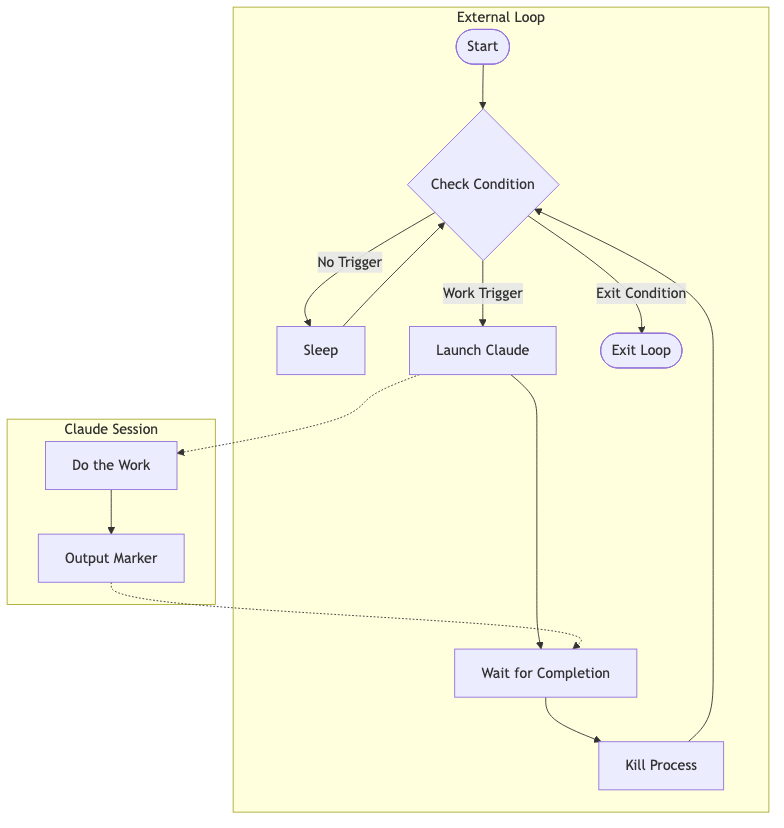
This isn’t a single script, but a small framework. The “Engine” is a Bash loop that handles the lifecycle of ephemeral Claude sessions. It doesn’t keep Claude open; it spawns him only when there’s work to do.
- The Monitor: The script polls an external condition (e.g., GitHub API or CI logs) every 10–30 seconds.
- The Trigger: When a condition is met (a build fails, say), the script calls a hook to construct a prompt.
- The Spawn: It launches a fresh Claude session in YOLO mode (
--dangerously-skip-permissions) to fix the problem, commit, and push. This is a calculated risk; without it, Claude asks permission for every file operation and the unattended loop stalls. The prompt becomes your only guardrail, so I include stern warnings like “Do not delete any files. Do not modify anything outside the src/ directory.” - The Marker: I tell Claude to output a specific magic string (like
WORK_COMPLETE) when it’s done. The Bash script watches for it, kills the process, and goes back to monitoring. - The Exit: When the external condition signals success (CI goes green, for example), the loop exits entirely.
Use Case: The CI Fixer
Fixing CI is the obvious use case. A human shouldn’t sit refreshing a build page waiting for a linter error.
With the External Engine, the script detects the failure, grabs the logs, and tells Claude: “The build failed with these errors. Fix the code, verify it, and push.”
Because the prompt constructor can be stateful (reading from a local file), I can also tell Claude things like, “This is your second attempt at fixing this flaky test; try a different approach.”
The UX Layer: Don’t Run Headless
One last detail for the External Engine: use tmux.
I tried running these loops silently in the background, but a silent loop is a black box. You don’t know if the agent is hallucinating or stuck on a wrong assumption.
My script launches the child Claude session inside a dedicated tmux pane.
- Visibility: I can see the “thinking” scrolling by in my peripheral vision.
- Intervention: If I see Claude chasing a red herring, I can type into that pane while it’s running to steer it back on course.
- Audit: When the process dies, the text remains for me to review.
Summary
These two loops cover most of what I want from automated Claude sessions. The Ralph Loop gives me deep, high-confidence code reviews while I sleep. The External Engine babysits builds and clears mundane errors so I can spend my attention on the parts of the work that actually need a human.
A single engineer can run five or six of these in parallel without breaking a sweat. The point isn’t to code faster; it’s to stop spending the day waiting and re-reviewing.